 Zoho CRM AI agent
Every lead in Zoho gets its first answer
from an assistant trained on your knowledge.
With the Zoho CRM AI agent you assign a trainable AI agent, trained on your own knowledge, to your WhatsApp and Telegram lines. A message arrives, a record is created or matched in Zoho, and the agent answers from your price list and your website. If it is not sure, or the customer asks for a person, it goes quiet; the conversation goes to the owner of the Zoho record.
No WhatsApp Business API required · No monthly AI subscription · 500 free credits in the trial
The record opens in Zoho, the assistant answers,
you make the decision
The missing piece in Zoho CRM
Zia in Zoho gives you predictions and writing help on your CRM data. An assistant that works with your own WhatsApp number, is trained on your price list and answers the customer on its own is not built into Zoho CRM; separate products require the official API and a separate subscription. This page explains that gap.
With your own knowledge
Not a generic chatbot: PDFs, your website, question and answer pairs. When a question is not in the knowledge base, it says a human is needed instead of making something up.
The Zoho record is created first
Before the assistant answers, the number is searched in Zoho; if it is not there, a Lead, a Contact or a Contact plus Deal is created. The customer the assistant greets already exists in the CRM.
Handoff to the record owner
The conversation owner is the owner of the Zoho record. When the assistant goes quiet, the conversation is waiting for that person in the panel and in the chat window on the Zoho record.
Three steps, without touching Zoho
If your Zoho connection is already in place, the assistant is live in five minutes. Nothing changes on the Zoho side.
Define the agent
You write the name, personality, goal, rules and model (GPT-5 family); for example 'Give the price only as a range and leave the appointment to a consultant'. Details: all agent settings.
Add knowledge
Crawl your website, upload PDFs, enter question and answer pairs. In the test area of the panel, write like a customer and see the answer and its source.
Assign it to a line
On the AI Settings tab of the Zoho page, pick an agent next to each WhatsApp and Telegram line. The sales line gets a sales agent, the support line a support agent.
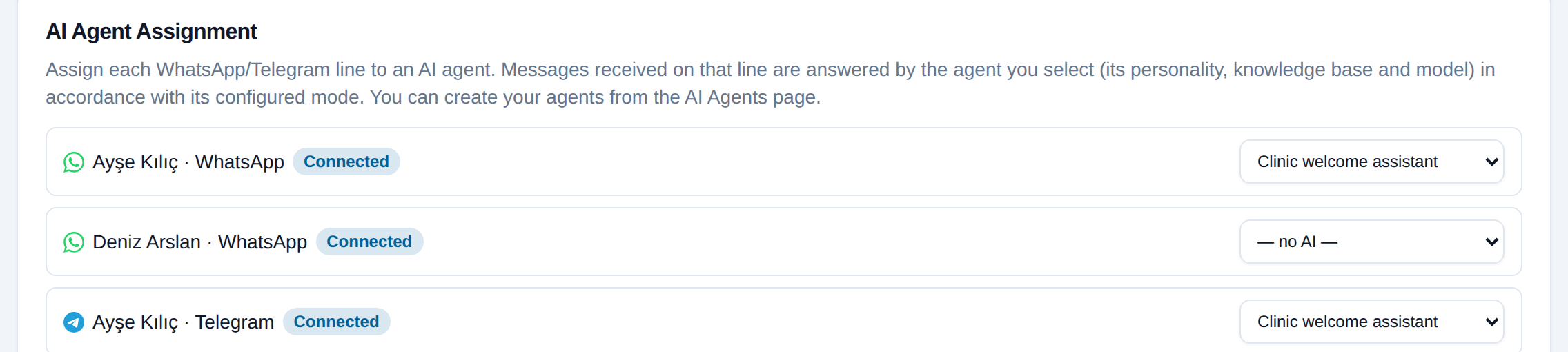
Each line gets its own agent;
the assignment stays even if the channel drops
The record opens, the assistant answers, and leaves it to the owner if needed
Nothing changes on the Zoho side: records, owners and stages work as usual; only the first answer is written by the assistant.
Technical details: suggestion mode and agent control
The suggestion sits inside the conversation
In suggestion or semi-automatic mode the draft appears above that conversation in the panel; the agent sends it with one click, edits it or discards it. A new draft replaces the old one.
Draft on request
Even when the assistant does not answer automatically, an agent can ask for an AI suggestion in the conversation; the assistant writes a draft from the conversation history.
The takeover race is closed
If an agent steps in while the model is preparing an answer, the answer is canceled before it is sent; two answers never go out for the same message, and the credit is charged once.
The assistant's replies and yours
both appear inside the Zoho record
What the assistant writes appears on the record's tab
The Write on WhatsApp window on Zoho contact, lead and deal records shows the whole conversation history: the assistant's replies with an AI agent label, the agent's replies under their own name. The agent continues in the same window without leaving Zoho.
Technical details
- The assistant's reply is stored in the panel and in the record window with an AI sender; it does not mix into agent performance in the reports
- Messages are not written to Zoho one by one as notes; the comments you write and form answers are saved to the record (Zoho integration)
- When the conversation owner changes, the record owner in Zoho changes too; the assistant never changes the owner
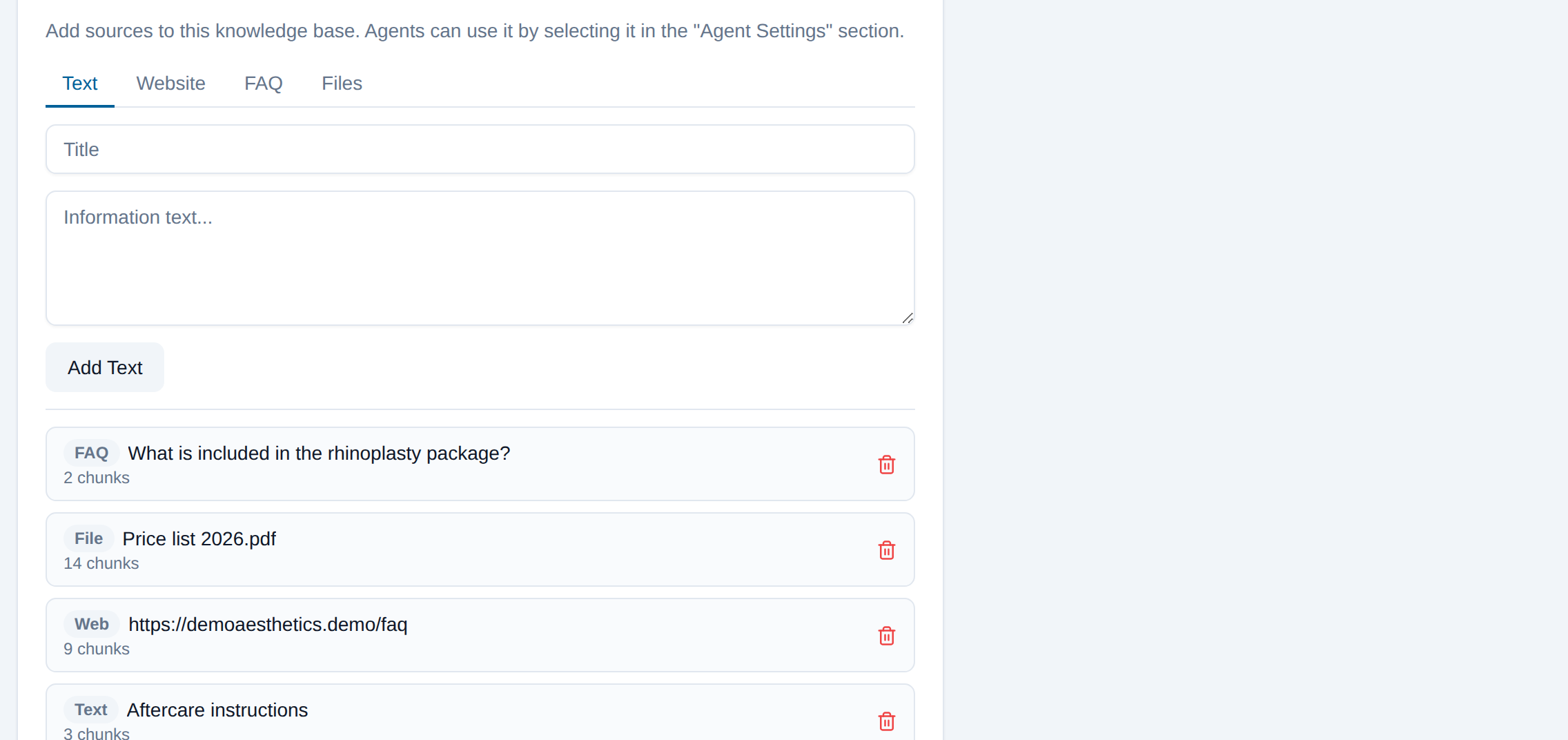
PDF, site, question and answer, text:
Zoho uses the same knowledge base
Zoho trainable AI: you provide the sources, it writes the answers
Text, a website crawl, question and answer pairs and files. For every question the most relevant parts are found and the answer is built from them. If you correct an answer you did not like in the reports, the correction is written into the knowledge base and the assistant uses it next time.
Technical details
- Sources: text, a single page or a whole site, FAQ pairs, files (PDF, txt, md, csv, json)
- Text inside a document is passed only as data; an instruction embedded in a document cannot change the assistant's rules
- One knowledge base can serve several agents, and one agent can use several knowledge bases
- The reply language follows the customer's language and the agent's rules; it sees the last 12 messages as context
Included in the line subscription; you pay only for the AI credits you use
There is no monthly subscription for the assistant; you can assign an agent on every connected line. It only consumes AI credits for the messages it handles. You do not need to open an OpenAI account; the infrastructure is ours and you top up credits. Details on the pricing page.
- One answer (GPT-5 mini, short)
- ≈ 3 credits (≈ $0.015)
- One answer (GPT-5)
- ≈ 14 credits (≈ $0.07)
- Starter pack 10,000 credits
- $50
When credits run out the assistant stops and the conversation stays with its owner; the customer is not left without an answer.
What you should know up front
The assistant does not write to Zoho
It does not change lead status, owner or fields, and it adds no notes. It gives information and hands off. Creating records and matching owners is the integration's own job, independent of the assistant.
It answers text messages only
On this path, messages with a voice note, a photo or a document go to the owner, not to the assistant. Voice and image understanding exists today only on the Bitrix24 Open Channel path.
Follow-up messages are not on this path yet
The timing of 'remind the customer an hour later if there is no reply' works today in the Bitrix24 Open Channel assistant; it is next in line for WhatsApp and Telegram lines.
There is no queue on the Zoho side at handoff
When the assistant goes quiet, the conversation is not distributed to another agent; it waits with the owner of the Zoho record (the conversation owner). If the record has no owner, it goes to the line owner.
Wrong answers are not zero
A good knowledge base lowers the rate but does not bring it to zero; suggestion mode, handoff rules and report feedback exist for this. We recommend reading the answers during the first week.
The provider is OpenAI, the key is on the platform
To produce an answer, the message text is sent to OpenAI. You do not need to connect your own OpenAI account, and it is not possible.
About the Zoho CRM AI agent
Why this assistant when Zoho has Zia?
Zia gives you predictions and writing help on your CRM data. An assistant that works with your own WhatsApp number, is trained on your price list, answers the customer on its own and goes quiet by your rules is not built into Zoho CRM. FlexInbox adds that assistant to the line connected to Zoho.
What is the Zoho trainable AI trained on?
Text, your whole website or a single page, question and answer pairs, and files (PDF, txt, md, csv, json). Answers you correct in the reports are also added to the knowledge base as FAQ entries.
Is a record created in Zoho while the assistant answers?
Yes, before the assistant. The number is searched in Zoho; if it is not there, a Lead, a Contact or a Contact plus Deal is created according to the mode you chose, and the conversation owner becomes the record owner.
Do the assistant's replies appear in Zoho?
The whole conversation history appears in the Write on WhatsApp window on the record; the assistant's replies are marked with an AI label. Messages are not written to Zoho one by one as notes.
What happens when the assistant hands off?
It goes quiet; the conversation waits for its owner (the record owner) in the panel and in the record window. The moment an agent writes, the assistant stops for good in that conversation; it keeps working on new customer conversations.
Can I try suggestion mode first?
Yes. In suggestion mode the assistant prepares a draft and shows it to the agent in the conversation; nothing goes to the customer on its own. When you trust it, you switch to semi-automatic or automatic mode.
Does it answer a voice message or a photo?
Not on this path; messages with media go to the owner. Voice and image understanding exists today only in the Bitrix24 Open Channel assistant.
Is there a monthly AI fee?
No. The assistant is included in the line subscription; it only consumes AI credits for the messages it handles ($0.005 per credit). The trial comes with 500 free credits.
Assign an assistant to your Zoho line today
Five minutes if Zoho is connected: set up the agent, crawl the site, pick the line. We put the knowledge base together with you during setup.
No credit card required · 500 free credits