A lead from your Meta ad,
with all its ad details, opens in Bitrix24.
The Meta Lead Ads CRM integration connects the Facebook lead form and the Instagram form to Bitrix24. The record is created the moment the form is submitted; the campaign, ad set and ad name are written to it as dropdown values. When the customer buys, you report it to Meta as a conversion; Meta then learns not only who filled in a form, but which leads turned into real sales.
Currently available with Bitrix24
 Currently available with Bitrix24
$79/month per ad account · One fee, however many campaigns · With Bitrix24
- Meta Campaign
- Rhinoplasty UK 2026
- Meta Ad Set
- Manchester 35-55
- Meta Ad
- September - Free Consultation
- Source
- Instagram Lead Ads
- Treatment of interest
- Rhinoplasty
Form answers go into fields,
ad breakdown into dropdown lists
It is not enough for the form to reach your CRM; the ad it came from should reach it too
Plenty of tools move the form into your CRM. The problem: the record says 'came from Facebook', but not which campaign, which ad set or which ad it came from. At the end of the month the question 'which ad brought sales' has no answer; budget is split by guesswork.
The breakdown becomes a dropdown
Campaign, ad set and ad name become dropdown fields in Bitrix24, not free text. You can filter, group and report on them; when a new ad appears, the list grows on its own.
You do the mapping
You choose which form question is written to which Bitrix24 field. If we guessed, we would quietly produce wrong data that goes unnoticed for months; so we do not guess.
The sale goes back to Meta
When the record moves to the 'Won' stage, you report it to Meta as a conversion. Meta then learns not only who filled in the form but which leads turned into real sales; you can optimize your campaigns for more valuable results.
Three steps, with no Meta app review
A ready Meta authorization setup is used, so you do not need to create your own Meta app or go through App Review.
Connect your Facebook account
In the panel, on the Meta Ads tab of the Bitrix24 page, you connect your Facebook account and pick your page. Your ad accounts come with the connection; you choose which ones are in scope.
Connect the form, map the fields
Your lead forms appear in a list. You pick the one you want to connect and put a Bitrix24 field next to each form question. You also choose the record type here: Lead, Contact, or Contact + Deal.
Set the owner and the source
You choose who the records from this form go to and what is written to the source field. Round-robin distribution keeps records evenly assigned across your team.

Which form is connected, how many fields are mapped:
you see it at a glance
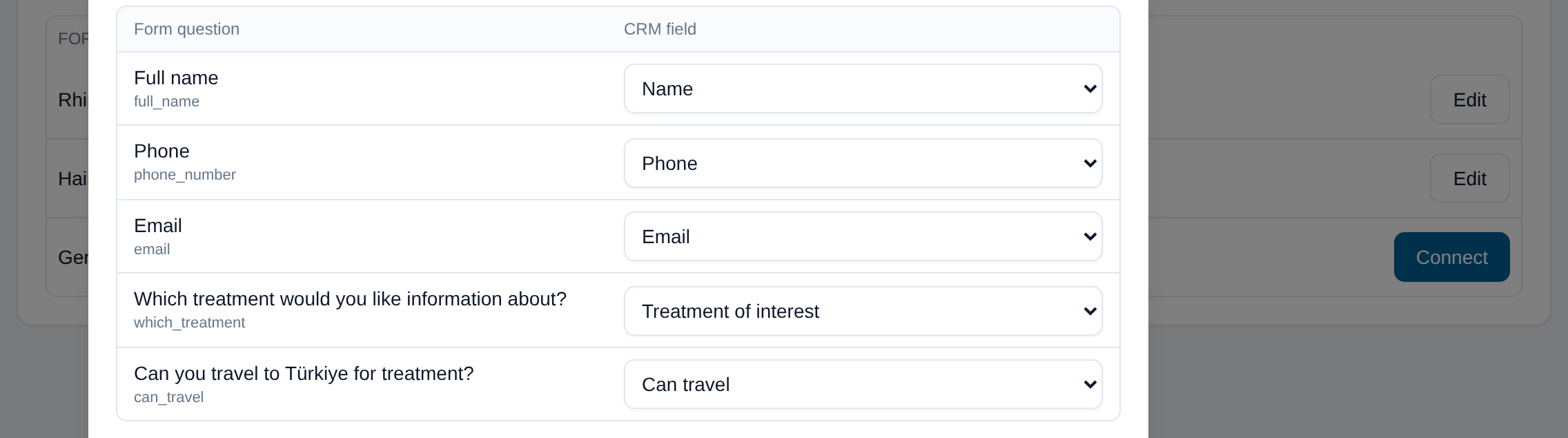
You choose the target field
for every form question
Whatever the customer wrote sits in the right Bitrix24 field
The answer to the question 'which treatment do you want' is written to the field you chose; multiple-choice answers land on their match in the Bitrix24 list. Answers you did not map are not lost, they are noted on the record timeline.
Technical details
- Until the mapping is saved, a lead is not written to Bitrix24; it waits. When the mapping is saved, the waiting leads are written retroactively
- Ad breakdown fields (UTM and Meta fields) are not offered as mapping targets, so no one can overwrite your own breakdown by mistake
- When the record type changes (Lead → Contact + Deal) the mapping resets; in Bitrix24 lead fields and deal fields are not the same
- Phone numbers are converted to E.164 before writing; the Meta Lead ID prevents duplicate records
- The owner and the source are checked against Bitrix24 before writing, to confirm they are still valid; Bitrix24 accepts an invalid ID silently and the record becomes invisible, so we catch that
| Lead | Meta Ad Set | Meta Ad |
|---|---|---|
| Emily Carter | Manchester 35-55 | September - Free Consultation |
| Sophie Dubois | Manchester 35-55 | September - Free Consultation |
| James Whitfield | London 25-45 | September - Before After |
UTM_SOURCE · UTM_CAMPAIGN · Meta Lead ID · Meta Ad ID are stored on the record too
Which ad brought the customer:
you see it in your own CRM report
Campaign, ad set and ad name are written to the record
For every lead, the campaign, ad set and ad it came from is written to Bitrix24 in two layers: standard UTM fields and dropdown fields. Campaign, ad set and ad details go into Bitrix24 fields, so they can be filtered, grouped and reported on in CRM lists.
Technical details: name resolution, queueing, duplicate control
- The Meta lead payload carries only IDs, not names; names are resolved from the ad tree and kept in cache (55 ads in about 3.5 seconds)
- A name can change but the ID does not; both are stored, and past records are tracked by ID
- A dropdown option is added when the first lead arrives; options are never deleted, so the values on past records stay intact
- The fields appear read-only on the Bitrix24 card; API writing stays open so the integration can keep writing
- The platform (Facebook or Instagram) and the form name are kept in separate fields too
- During temporary problems leads are queued and processed again once the connection recovers; a lead is not lost even if you map it later
- The Meta Lead ID prevents duplicate records; if the same lead is reported a second time, no second record is created in Bitrix24
- When Bitrix24 converts the lead into a deal, the breakdown fields move to the deal and conversion tracking continues on the deal
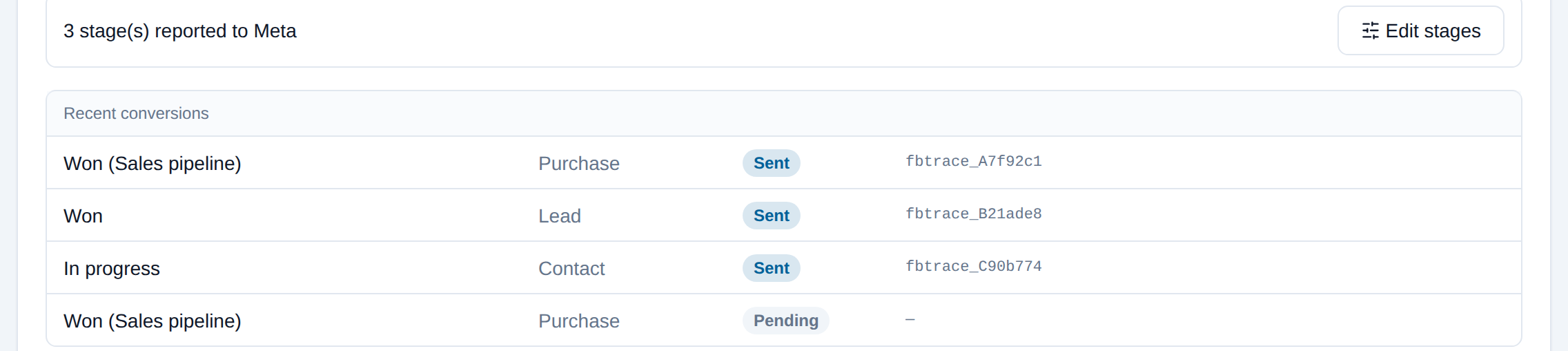
Which stage was sent and its trace code:
you see it on every row
Report the sales result back to Meta
With the Bitrix24 Conversion API integration you choose which Bitrix24 stage matches which Meta event (Lead, Contact, Purchase); when a record reaches that stage, the conversion is reported to Meta. On stages that carry an amount, the sales value is sent too. Meta does not take back a conversion it has received, so sending runs in dry-run mode first and goes live only after you approve it.
Phone numbers and email addresses are not sent. The conversion is matched through Meta's lead ID.
Technical details
- Four modes: off (the default), dry run (the payload is built but does not go to Meta), test (with a Meta test code), and live
- Matching uses Meta's lead ID; email addresses and phone numbers are not sent to Meta
- Every event has a fixed ID; a retry does not create a duplicate conversion
- A failed event is not retried on its own; it shows in the log and you retry it by hand with one click. Bulk retry is deliberately absent
- The funnel statistics show how many times each stage is passed per week and how long it takes on average; you decide which stage to report based on that and on Meta's attribution window
- The pixel is picked from a live list; without ad account permission no pixel appears
One price per ad account
The Meta ads module is $79 per month or $790 per year, per ad account. The number of campaigns, forms and leads makes no difference. You choose which ad accounts are in scope; no leads arrive from the forms of an account you did not select. The module is bought separately from your WhatsApp line; details on the pricing page.
One ad account, unlimited campaigns and forms.
There is no extra charge per lead, campaign or form.
- No manual form exports; the lead is in Bitrix24 within seconds
- Campaign, ad set and ad details are written automatically
- Per-form owner distribution and source assignment
- Reporting the sales conversion to Meta (Conversion API)
- Duplicate record control with the Meta Lead ID
- 1 ad account, 12 campaigns, 6 forms
- $79 / month
- 2 ad accounts (TR + UK)
- $158 / month
- Annual payment, 1 account
- $790 ($65.83 per month)
There is no separate charge on the Meta side for lead forms or conversion reporting; your ad budget is paid to Meta as usual.
What you should know up front
Today it works with Bitrix24 only
Writing forms to the CRM and reporting conversions work with Bitrix24 today. Zoho, HubSpot and GoHighLevel are next; in the meantime you can use those CRMs' own Lead Ads connections.
No mapping, no lead written
If you connect a form but do not map its fields, that form's leads wait with us and are not written to Bitrix24. We chose waiting over guessing and writing to the wrong field; once the mapping is saved they are written retroactively.
A sent conversion cannot be taken back
Meta does not delete a conversion it has received. That is why sending is off by default, is set up in dry-run mode first, and has no bulk resend button by design.
Meta's retention and attribution rules apply
How far back past leads can be pulled, and the conditions for attributing conversions to an ad, are subject to Meta's current retention and attribution rules; leads from before the integration may not be retrievable.
When license scope narrows, leads stop
If the number of licensed ad accounts is exceeded, the most recently added account is taken out of scope after 3 days and no leads arrive from that account's forms; leads that did not arrive cannot be recovered. If the quota is unclear, nobody is cut off.
You need permission on the ad account
The Facebook account you connect must have permission for the ad account and the page in Meta Business; without it, forms or the pixel are not listed. This is granted on the Meta side.
About Meta Lead Ads CRM integration
Why use this when Bitrix24 has its own Facebook form connection?
The Bitrix24 connection moves the form into the record; it does not carry the campaign, ad set and ad name as fields. This integration writes the breakdown as dropdown values, assigns the owner and the source by your rules, and reports the sale back to Meta as a conversion.
Do Instagram forms come through as well?
Yes. A Facebook lead form and an Instagram form land in the same list; the platform is kept in a separate field on the record.
Do I have to create my own Meta app and go through review?
No. Our provider setup handles the Meta authorization. You only connect your Facebook account in the panel and pick your page and your ad accounts.
Who is a record from the form assigned to?
You decide per form: one person or several. If you pick several, records are distributed in turn. You also choose the source field per form.
Is the record created automatically when a lead arrives?
If you connected the form and mapped its fields, yes, within seconds. If there is no mapping, the lead waits with us and is written retroactively the moment you save the mapping; no lead is lost.
What is needed for conversion reporting?
Your ad account's pixel, and your choice of which stage matches which Meta event. Sending is set up in dry-run mode first; you try it with Meta's test code and then go live. This order is deliberate, because a sent conversion cannot be taken back.
What is the Bitrix24 Conversion API integration?
The Bitrix24 Conversion API integration reports to Meta, as a conversion event, that a Bitrix24 record has reached the stage you chose. Meta then learns not only who filled in the form but which lead turned into a sale; you can optimize your campaigns for real results.
Does the customer's phone number or email address go to Meta?
No. Matching uses Meta's own lead ID; no personal data is sent to Meta.
How is it priced?
$79 per month or $790 per year, per ad account. The number of campaigns, forms and leads does not affect the price. There is no separate charge on the Meta side for lead forms or conversion reporting.
Connect your lead forms to Bitrix24 today
Connecting your Facebook account takes five minutes, mapping the first form ten. We dry-run conversion reporting together during setup.
$79/month per ad account · The Meta Ads module is not included in the 14-day trial, write to us for trial access