 Bitrix24 AI agent
An assistant for your Open Channels
trained on your own content.
With the Bitrix24 AI agent you assign a trainable AI agent to each Open Channel. The agent learns your price list, your website and your frequently asked questions; it answers customers arriving from WhatsApp and Telegram inside the Open Channel conversation. If it is unsure, or if the customer asks for a person, it hands the session over to the Bitrix24 queue.
No waiting for Bitrix24 Market approval · Each line covers 5 Open Channels · 500 credits free in the trial
It answers what it knows,
and sends the rest to the Bitrix24 queue
The missing piece in Bitrix24
Bitrix24 CoPilot helps an agent while they write. There is no built-in assistant that is trained on your own price list, answers the customer on its own in the Open Channel, and hands off by your rules. This page explains that gap.
With your own knowledge
Not a generic chatbot: PDFs, your website, question and answer pairs. When a question is not in the knowledge base, it says a human is needed instead of making something up.
Inside the Open Channel
Answers appear in the Bitrix24 Open Channel conversation, and leads and records are created as usual. Your team never leaves Bitrix24 and learns no new tool.
Handoff goes to the Bitrix24 queue
When the assistant hands off, the session falls into the Open Channel's own routing rules; Bitrix24 decides which agent takes it. You do not set up a second routing system.
Three steps, without touching Bitrix24
The bot registers itself in your portal while the Bitrix24 connection is made. You set up the agent, give it knowledge, and assign it to a channel.
Define the agent
You write the name, personality, goal, rules and model (GPT-5 family); for example 'Give the price only as a range and leave the appointment to a consultant'. Details: all agent settings.
Add knowledge
Crawl your website, upload PDFs, enter question and answer pairs. In the test area of the panel, write like a customer and see the answer and its source.
Assign it to an Open Channel
On the AI Settings tab of the Bitrix24 page, pick an agent next to each Open Channel. From that moment the assistant joins every new session opened on that channel.
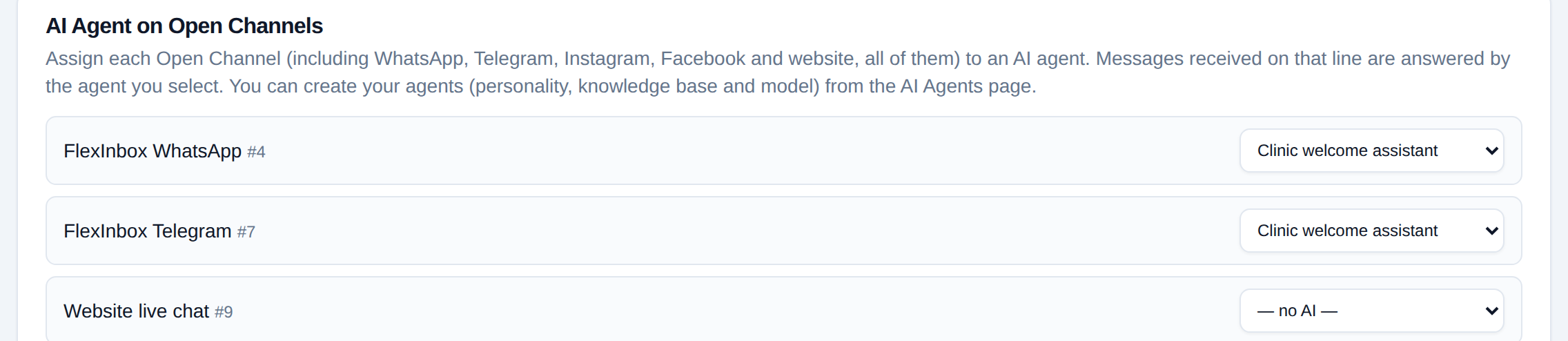
Each Open Channel gets its own agent;
sales and support can be different
A session opens, the assistant joins, and hands off to the queue if needed
Every step runs on Bitrix24's own Open Channel mechanism; there is no second chat system next to it.
Technical details: operator control and new sessions
AI on/off button in the conversation
There is a button under every assistant message, plus the /ai off and /ai on commands. An agent can stop the assistant in a session and turn it back on; the status is reported back to them.
It goes quiet when a human writes
If an operator writes from Bitrix24, from the panel or from the phone, the assistant stops in that session. If the takeover happens while the model is preparing an answer, the answer is canceled before it is sent.
It comes back in the next session
The pause belongs to the session. When the session closes and the customer writes again later, the assistant joins the new session.
It understands voice, understands images, does not forget
The Bitrix24 Open Channel assistant has three things the assistant on direct WhatsApp lines does not.
Voice messages are transcribed
If a customer leaves a voice message, the assistant transcribes it and answers. The transcription cost is included in credits, with no separate fee.
Photos and screenshots are understood
If a customer sends an image, the assistant reads what is in it and answers the question accordingly; 'what does this product cost' can be asked with a photo.
It follows up when there is no reply
If the customer does not answer the assistant's last message, a chained follow-up runs: you write the steps, such as after 1 hour, then after 6 hours. The follow-up is canceled when the customer writes.
Technical details
- The follow-up message is not a template but text the assistant writes from the conversation history; the same follow-up never goes out twice (each send is stamped)
- The follow-up chain runs at most as many steps as you write; it stops when the customer replies or an agent takes over
- Voice and image processing also consume credits; the report shows text and media cost together
- Out-of-hours mode and the human-like reply delay apply here too
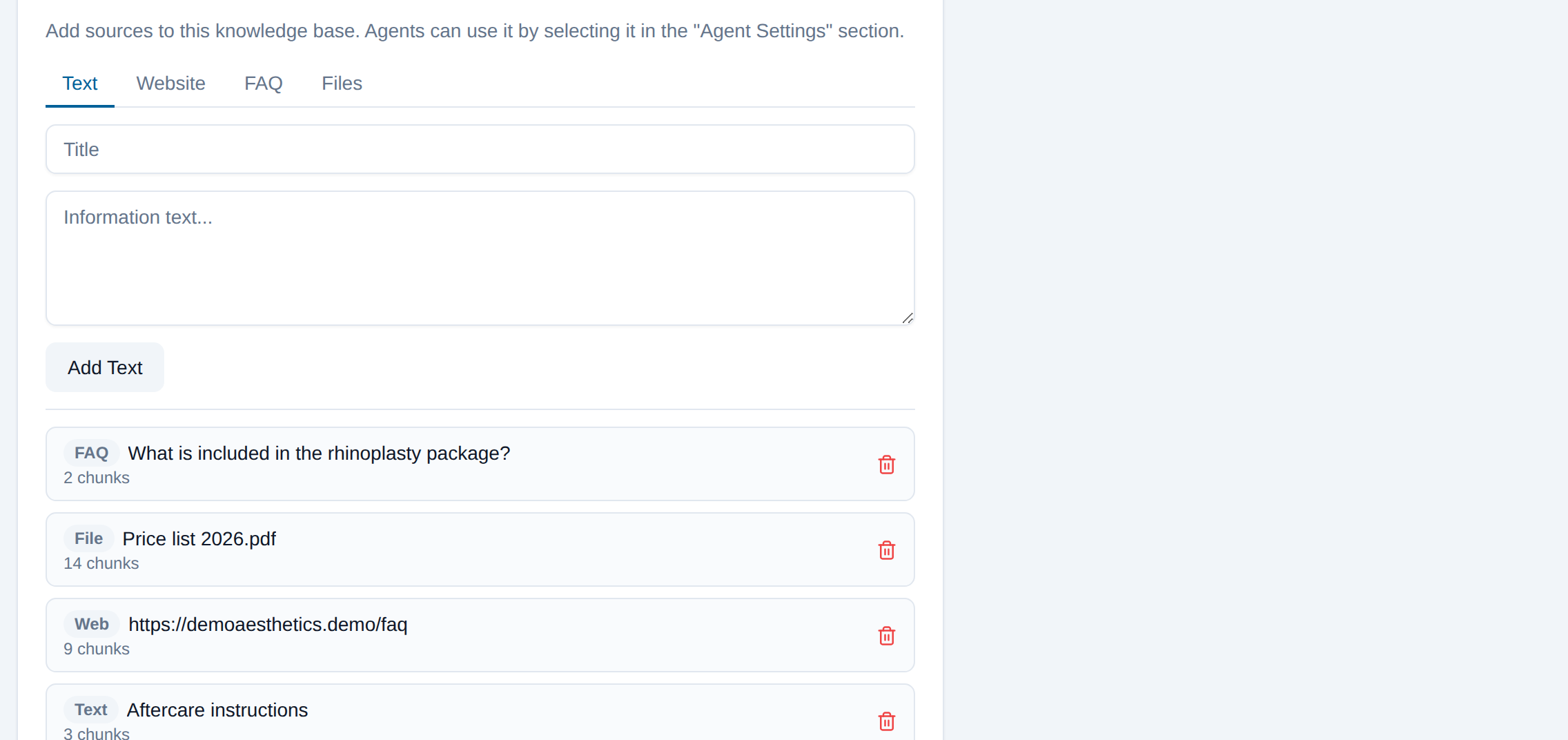
PDF, site, question and answer, text:
Bitrix24 uses the same knowledge base
Bitrix24 trainable AI: you provide the sources, it writes the answers
Text, a website crawl, question and answer pairs and files. For every question the most relevant parts are found and the answer is built from them. If you correct an answer you did not like in the reports, the correction is written into the knowledge base and the assistant uses it next time. The same knowledge base can also be connected to the assistant on your WhatsApp line.
Technical details
- Sources: text, a single page or a whole site, FAQ pairs, files (PDF, txt, md, csv, json)
- Text inside a document is passed only as data; an instruction embedded in a document cannot change the assistant's rules
- One knowledge base can serve several agents, and one agent can use several knowledge bases
- The reply language follows the customer's language and the agent's rules
Each line gives assistant rights for five Open Channels
Every WhatsApp or Telegram line you connect brings the right to assign an assistant to five Open Channels; even an account with no line gets an assistant on one Open Channel for free. There is no monthly subscription for the assistant itself; it only consumes AI credits for the messages it handles.
If you need assistants on more Open Channels, write to us for an extra Open Channel pack. You can find credit prices on the pricing page.
- 2 WhatsApp lines
- 10 Open Channel assistant slots
- One answer (GPT-5 mini, short)
- ≈ 3 credits (≈ $0.015)
- Voice message transcription (1 min)
- ≈ 30 credits
- Starter pack 10,000 credits
- $50
When credits run out, the assistant stops and the session falls into the queue; the customer is not left without an answer.
What you should know up front
Open Channels must be on your plan
The assistant runs on the Open Channels feature of Bitrix24; that feature must be included in your Bitrix24 plan and cannot be enabled by us.
The assistant takes no actions
It does not change lead fields, create appointments or open tasks. It gives information and hands off. For automation that changes a stage there are robots; details on the Bitrix24 page.
After handoff, Bitrix24 manages the queue
After the assistant gives the session to an operator, which agent it goes to is the Open Channel's own routing rule; the assistant does not pick a person.
Wrong answers are not zero
A good knowledge base lowers the rate but does not bring it to zero; handoff rules and report feedback exist for this. We recommend reading the answers during the first week.
The provider is OpenAI, the key is on the platform
To produce an answer, the message text (and any voice or image) is sent to OpenAI. You do not need to connect your own OpenAI account, and it is not possible.
The quota is limited on purpose
Each line carries five Open Channel slots; beyond that you need an extra pack. This limit keeps an account with no line from running unlimited assistants.
About the Bitrix24 AI agent
Bitrix24 already has AI, so why FlexInbox?
Bitrix24 CoPilot helps an agent write text. There is no built-in assistant that is trained on your price list, answers the customer on its own in the Open Channel, and hands off to an operator by your rules. FlexInbox adds that assistant as the welcome bot of the Open Channel.
What is the Bitrix24 trainable AI trained on?
Text, your whole website or a single page, question and answer pairs, and files (PDF, txt, md, csv, json). Answers you correct in the reports are also added to the knowledge base as FAQ entries.
Where do the answers appear in Bitrix24?
Answers appear inside the Open Channel conversation, under the assistant's own name. Leads and records are created as usual; the agent continues in the same conversation.
Who gets the conversation when the assistant hands off?
Bitrix24 does. The session is given to the Open Channel queue and the Open Channel routing rule picks the agent. The moment an agent writes, the assistant goes quiet in that session; they can turn it back on with the button in the conversation.
Does it answer a customer who sends a voice message or a photo?
Yes, on the Open Channel path. Voice messages are transcribed and images are read; both are included in credits. The assistant on direct WhatsApp lines does not do this, so media goes to a person.
How many Open Channels can I assign an assistant to?
Each connected WhatsApp or Telegram line gives five Open Channel slots; an account with no line gets one Open Channel for free. For more you buy an extra pack, just write to us.
Is it installed from the Bitrix24 Market?
No. When you connect your Bitrix24 portal in the panel, the bot registers itself in your portal; you do not wait for Market approval. Assigning it to an Open Channel is one choice in the panel.
Is there a monthly AI fee?
No. The assistant is included in the line subscription; it only consumes AI credits for the messages it handles ($0.005 per credit). The trial comes with 500 free credits.
Assign an assistant to your Open Channel today
Five minutes if the portal is connected: set up the agent, crawl the site, pick the channel. We put the knowledge base together with you during setup.
No credit card required · 500 free credits