Your Telegram conversations
inside the CRM record.
Telegram CRM integration connects your team's Telegram accounts to the panel: incoming messages land in the same inbox as your WhatsApp conversations and are written to the Zoho CRM, Bitrix24, HubSpot and GoHighLevel record. Your customer writes to a real Telegram account, not a bot.
$50/month per line · 14 days free · Setup takes minutes
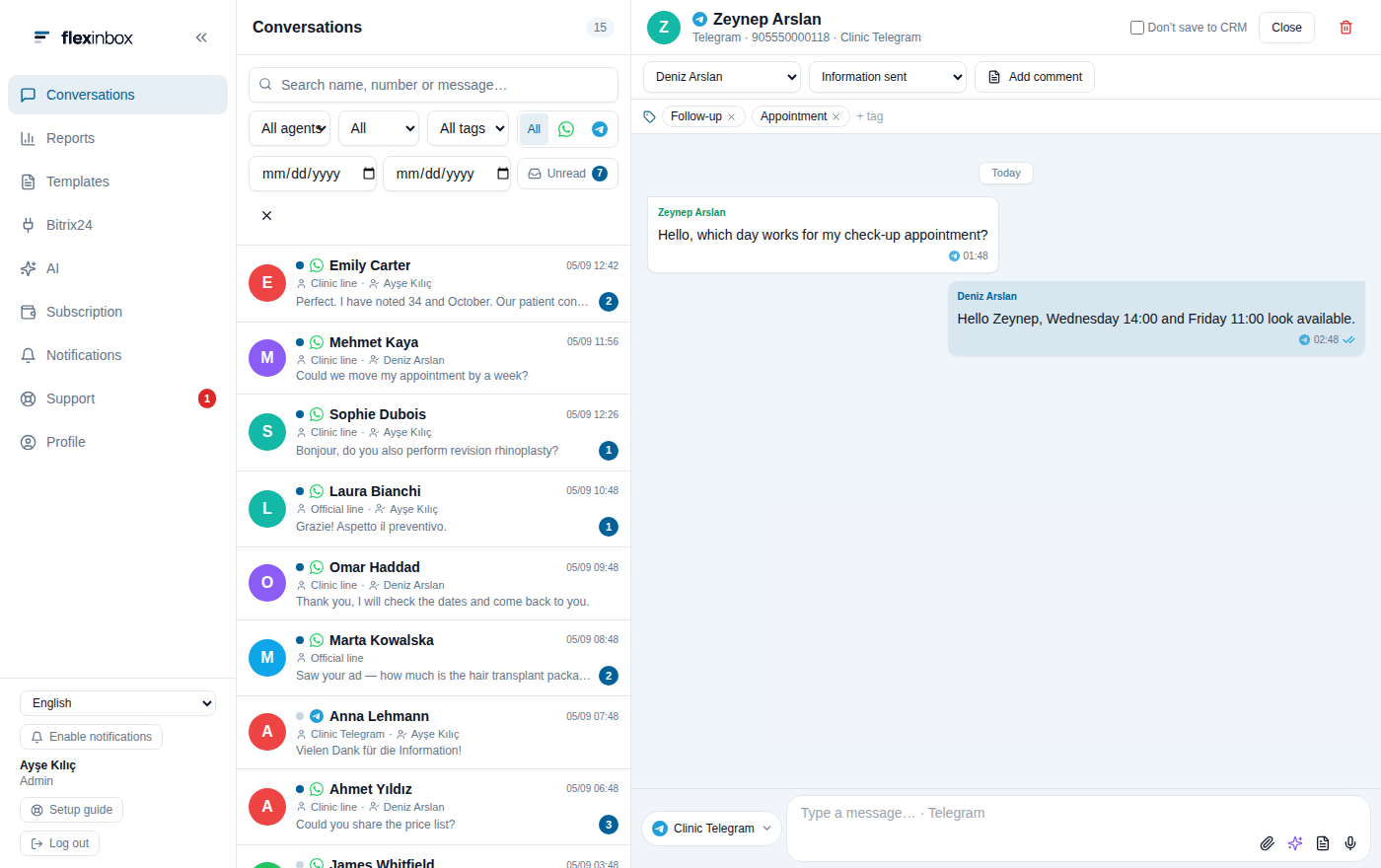
A Telegram chat opens with the same
CRM fields as a WhatsApp one
Stop watching a second app
Do not open a separate screen for Telegram customer service: a customer on Telegram should not live somewhere else than a customer on WhatsApp. The same screen, the same record, the same reports.
One inbox
Telegram conversations sit in the same list as your WhatsApp ones. The channel filter shows you Telegram only.
The same CRM record
The conversation is written to the customer record; owner, stage, tags and notes are handled exactly where you handle them for WhatsApp.
A real account, not a bot
Your customer is not writing to a bot. On the other side there is a real Telegram account with a username and a profile photo.
Connected in three steps
The Telegram account is added through Telegram's own device-linking flow. You install nothing and apply for no API access.
Assign the line to a person
In Subscription › Line Assignments you open a Telegram line and assign it to the person who will use it.
Scan the QR code
That person follows Telegram › Settings › Devices › "Link Desktop Device" and scans the QR code shown in the panel.
Two-step verification
If two-step verification is on, the panel asks for the Telegram cloud password. This is not the panel password; it is Telegram's own.
The channel filter is one click
By default the list shows every channel. The channel button at the top narrows it to Telegram conversations; the line name, the owner and the tags stay on every row.
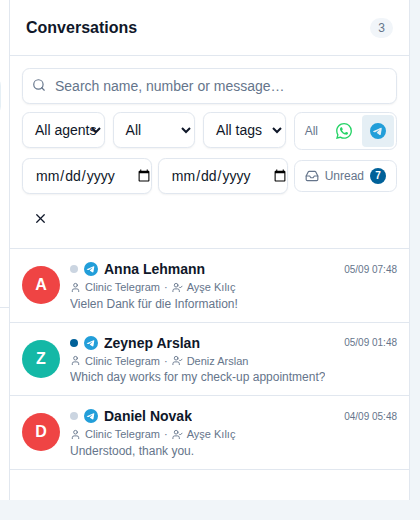
Telegram conversations only
How is this different from a bot account?
You do not wait for the customer to write first
On Telegram, bot accounts cannot start a conversation: the customer has to find the bot and start it first. FlexInbox connects to your agent's own Telegram account, not to a bot. You can send the first message to a customer whose number is registered on Telegram.
- The customer sees an account with a username and a profile photo
- No approved template, no button consent and no bot command is needed
- Messages go out at human speed; this is not a bulk-sending tool
- Writing to people who never wrote to you puts the account at risk; the decision is Telegram’s
A line belongs to one person
A Telegram line belongs to a single person and only that person uses it. Several agents writing from one number, as on the official WhatsApp line, does not exist on Telegram.
- An administrator assigns the line to a member of staff from the Subscription screen
- If the connection drops, the agent can scan the QR code again from their own panel
- If the session is ended from Telegram (Settings › Devices), the line is marked disconnected
- The session key is stored encrypted in the database
What happens in each CRM
A Telegram message travels the same path as a WhatsApp one; there is no separate setup on the CRM side.
Bitrix24
An incoming Telegram message is forwarded to an Open Channel. Every agent's Telegram line is mapped to an Open Channel, and the AI agent on that Open Channel answers on Telegram too.
Zoho CRM and HubSpot
The conversation is written to the lead, contact or deal record. You can write from Telegram in the chat window on the record card as well.
GoHighLevel
Telegram conversations land in GoHighLevel conversations and are managed per sub-account.
Whatever you have on WhatsApp
Everything beyond plain text is supported on a Telegram line too.
Media
Photo, video, voice message, PDF and files. Images and video arrive playable, documents arrive as files.
Quotes and reactions
You reply by quoting a message; emoji reactions are visible in both directions. Read receipts reach the panel.
AI agent
The agent you assign to the line answers on Telegram conversations too, and steps aside as soon as an operator starts typing.
Tags, owner, notes
You tag a conversation, change its owner and write a note to the CRM record. Reports count it together with WhatsApp.
Saved replies
Your saved replies work on a Telegram line as well.
Number check
Bitrix automation can check whether the number is on Telegram at all and change a stage or a field when the channel is missing.
What to know about a Telegram line
Some of this comes from how Telegram works, some from where FlexInbox stands today.
One-to-one conversations only. Telegram groups and channels do not reach the panel; only direct conversations with a person are processed.
A line belongs to one person. Only the person a Telegram line is assigned to can use it. The shared-number model of the official WhatsApp line does not exist on Telegram.
A customer who hides their number. When a customer hides their phone number on Telegram, the number never reaches us; the conversation opens in the panel and you can answer it, but it is not matched to a CRM record automatically and you pick the record by hand.
Show all technical limitations
No approved templates and no bulk sending. Template approval, forms (WhatsApp Flows) and bulk sending belong to the official WhatsApp line; they are not available on a Telegram line.
Ending the session disconnects the line. If the session is closed from Telegram › Settings › Devices, the connection drops and the QR code has to be scanned again.
The two-step verification password is required. If two-step verification is on, the Telegram cloud password is entered while connecting; we do not generate that password, the account owner knows it.
Telegram's rules apply. Sending unsolicited messages from a personal account can get it restricted. That risk comes from how the tool is used, not from the tool.
About the Telegram integration
How is the Telegram CRM integration set up?
You open a Telegram line in the panel and assign it to the person who will use it. That person follows Telegram › Settings › Devices › "Link Desktop Device" and scans the QR code in the panel. If the account has two-step verification, the Telegram cloud password is asked for. No application and no developer account is needed.
Are you using a bot?
No. Your agent's own Telegram account is connected. Bot accounts cannot start a conversation; with a real account you can send the first message to a customer whose number is registered on Telegram.
Do Telegram groups reach the panel?
No. Only one-to-one conversations are processed. Groups and channels stay in the app on the phone.
Can two agents use the same Telegram account?
No. A Telegram line belongs to one person and is assigned to a single user. Several agents writing from one number is possible on the official WhatsApp line.
What happens if the customer hides their number?
The conversation opens in the panel as usual and you answer it; but because the number is unknown it is not matched to a CRM record automatically. You pick the record from the conversation by hand.
How much is a Telegram line?
$50 per line per month, or $480 per year. The same price as a WhatsApp line; the two run side by side in one panel and are included in the 14-day free trial.
Can I use WhatsApp and Telegram at the same time?
Yes. One user can connect both a WhatsApp and a Telegram line; the conversations gather in one list and are counted together in the reports.
Connect your Telegram line today
Open the line, scan the QR code; the first message reaches the panel within a few minutes.
No credit card · 14 days free